Jamás vi una herramienta semejante para otros juegos. Jamás. Claro, que la saga Wizardry es especial: Apasionante, compleja, complicada, adictiva, tremenda, original...
¡ATENCIÓN! Las descargas están al final de la página.
Enlace:
http://www.angelfire.com/magic2/madgod/CosmicForge.html
Información:
mad god's *Cosmic Forge* Editor for Wizardry 6, Wizardry 7 and Wizardry 8
*宇宙炉*
Recent Updates
03, November, 2008
* General: Version has been changed to 2.64.
* W8: Location Editor: Terrain Tab: When deleting a Terrain Mesh or some of its Faces after you agreed to delete Physical Faces corresponding to the Terrain Faces, a dialog pops up requesting a value that will be used to evaluate if a Physical Face corresponds to a Terrain Face. This value is compared with the distance between a Mesh Vertex and a Phisical Vertex: if the distance is less than this value then those two vertices are counted as matching. The value is remebered by the editor until the Terrain Editor dialog is closed.
* W6/W7: Game Information: Added ability to edit attributes, resistances, skills and experience values for a character class. Sidenote: you can activate personal skills for a class, BUT you get no points to distribute for personal skills until you activate a personal skill using normal way.
* W6/W7: Game Information: Added ability to edit attributes for a character race.
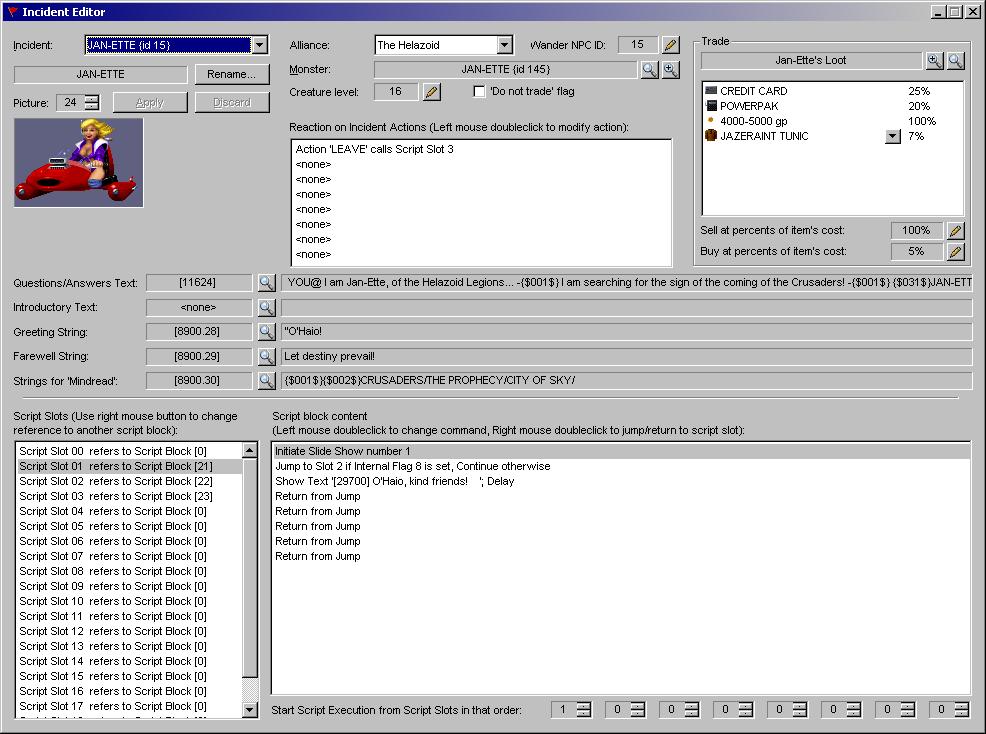
* W7: Incident Editor: Fixed small bug that had always set the Picture Group to 4 if it was less than 4. This had had been happening with two commands related to Pictures.
07, November, 2008
* General: Version has been changed to 2.65.
* W8: Location Editor: The World Box does not limit your Terrain anymore. Now you can have your Terrain out of the World Box. Read W8Tutorials for info.
* W8: Location Editor: 'Check & fix OCTree' command has been renovated. The progress and output is displayed on the 'General' page.
* W8: Location Editor: For several commands under the 'Tools' menu the progress output has been implemented.
* W8: Location Editor: Removed annoying message abount Unseen objects that popped up when you save a Location. Instead you can see info about Unseen objects in the Progress Output for 'Check & fix OCTree' command.
* W7: Game Information: Added support of yet another version of W7 binaries.
19, November, 2008
* General: Version has been changed to 2.66.
* W8: Fixed few Language Issues.
* W8: Location Editor: Physical Walls: The list control has been made bigger.
* W8: Location Editor: Physical Walls: 'Select all Faces having specific Flag(s) set...' command introduced. It does what it says.
* W8: Location Editor: Sky: It is now possible to add new Sky Objects & Celestial Bodies.
* W6/W7: Game Information: A bug was fixed (slightly incorrect game info writing).
* W6/W7: Game Information: It is now possible to modify classes' starting items. Same for Faerie race in W7. In W7Gold to some starting slots of some classes you can only specify items with ID less or equal 127.
* W6/W7: Game Information: It is now possible to modify classes' starting HP and Miss Chance Reductions.
* W7: Item Editor: It is now possible to modify item's Skill. Note though that Skill is determined by item's image, not by the item itself, so when you change Skill of an item you change Skill of all items with the same image.
23, November, 2008
* General: Version has been changed to 2.67.
* W8: Location Editor: Added 'Rebuild Octree' command to the 'Tools' menu. See Tutorials.rtf
* W8: Location Editor: Added 'Clear Location...' command to the 'Tools' menu. See Tutorials.rtf
* W7: Fixed a small bug that showed 'Hands&Feet' skill for the items that have 'Throwing' skill.
* W7: Game Information: Fixed a bug corrupting a game file during the save. As a result you could not create a ranger, monk or ninja.
8, December, 2008
* General: Version has been changed to 2.68.
* W8: Item Editor: The way to change Item's 'Appearance ID' has been changed.
* W8: General: Texture Selection Dialog has been redesigned.
* W7: Game Information: Generation-Time HP & Miss Chance modification algorithms are now versatile.
* W7: Game Information: It is now possible to edit Mana Regeneration values and Starting Spell Picks for classes. Yes, your thief can now learn some basic spells during the creation phase...
* W7: Game Information: It is now possible to edit LevelUp Miss Chance Reduction for all classes.
* W7: Game Information: It is now possible to edit LevelUp HP for all classes.
* W7: Game Information: The changes made by previous version of the editor will not be read by this version. You need to return original *.ovr files for W7 DOS and wizard.exe file for W7 Gold. Note that if you applied some patches you probably need to reapply them as well.
* W7: Game Information: A bug was fixed related to Item Image Skill change.
25, December, 2008
* General: Version has been changed to 2.69.
* W7: Patches: A new patch 'Learning Spells from Spellbooks' is available. It makes so your characters receive mana when learning spells from spellbooks. The amount of mana is twice the spell cost. For example learning the 1st level 'Directions' spell will add 6 mana into the Earth Sphere. Learning it normally you would get 3+ mana.
* W7: Game Information: It is now possible to unlock Personal Skills for Classes. Amount of Personal Skill Points received will depend on Personality and Karma as soon as you modify Game Information for the first time.
* W6/W7: Text Editor: Fixed a bug in the Optimization algorithm.
* W8: Location Editor: Terrain Editor: It is possible to create a new Terrain Mesh in the form of a geometrical figure. 6 different figures are now supported.
31, December, 2008
* General: Version has been changed to 2.70.
* W6/W7: Text Editor: Fixed dialog's layout.
* W8: Location Editor: Terrain Tab: New Mesh Splitting algorithm has been added: using 'foreign' vertices. Read Tutorials for futher info.
* W8: Location Editor: Terrain Tab: Tiny bug has been fixed: You couldn't move/rotate/etc a single selected Mesh's Face (except when you selected its all 3 vertices).
5, January, 2009
* General: Version has been changed to 2.71.
* W8: Location Editor: Terrain Tab: It is now possible to add new Faces to the selected Terrain Mesh using specified vertices (similar to the Physical Face addition). You can pick up vertices from different Meshes.
* W8: Location Editor: Terrain Tab: Terrain Tab layout has been slightly redesigned.
* W8: Location Editor: Terrain Tab: The management of Textures placement has been changed. See Tutorials for explanation in case the interface is not clear enough.
9, January, 2009
* General: Version has been changed to 2.72.
* W8: Location Editor: Terrain Tab: Additional options (usage of Faces for Vertex projection) have been added to the new functionality of automatic Texture placement.
* W8: Location Editor: Terrain Tab: 'Mirror Terrain Mesh' command has been introduced.
* W8: Monsters', Spells', Missiles' and Location Dynamic Objects' 3D Model Editor Page: 'Mirror' button has been introduced.
* W8: Location Editor: Terrain Tab: Tab layout has been modified.
* W8: Location Editor: Terrain Tab: 'RLK Optimization' checkbox has been removed to the 'General Parameters' Tab.
18, January, 2009
* General: Version has been changed to 2.80.
* W8: Main Dialog: 'MS3D (Milkshape) Model Importer...' menu has been added under the 'Tools' menu.
* W8: 3D Model Import: 'MS3D (Milkshape) Model Importer' dialog is introduced. It is capable to convert animated 3D models into W8 Monsters', Missiles' and Spells' models.
* W8: 3D Model Import: 3D Model Importers now has better Texture searching algorithm (since very often textures do not reside in the same folder where model is or even have another extension).
* W8: 3D Model Import: Textures are now being copied into the appropriate folders during 3D Model Import.
* W8: 3D Model Import: Textures are now being converted into tga format (W8 can use only *.tga format) automatically if you download and install 'LEAD Image Command Line Converter' program. It is small and free. You can get it here: http://www.leadtools.com/Utilities/Cmd-Line/File-Converter/default.htm
* W8: Tutorials: I have added a new tutorial "MLS (Monster Model Script) File Information". It is not complete, but anyway.
20, January, 2009
* General: Version has been changed to 2.81.
* W8: MS3D Model Import: Fixed small bug that caused imported monster models to have a tiny physical bounding box.
* W8: Modify Animated 3D Model Dialog: Fixed small bug exhibiting itself during Frame insertion.
* W8: Modify Animated 3D Model Dialog: Added positioning & rotation controls to help fine-tune imported models. Could be used to fine-tune existing monster/missiles/spells models as well.
* W8: Item Editor: Some edits with spins have been made editable so the required value could be directly entered instead of spinning the spin control.
29, January, 2009
* General: Version has been changed to 2.82.
* W8: Monster Editor Dialog: Layout has been slightly changed. Search controls has been introduced.
* W8: Added a menu item '3D Settings...' under the Setup menu in the main window. Allows to modify few 3D settings.
26, February, 2009
* General: Version has been changed to 2.83.
* W7: It is now possible to edit Races' Resistance Modifiers.
* W7: It is now possible to edit Classes' Skill Points Allotments.
* W7: As soon as you modify anything in Game Information there will be no more favourite Skills for classes. Not a big deal, I believe - you can now distribute points as you wish.
* General: A couple of small tweaks.
15, April, 2009
* General: Version has been changed to 2.84.
* General: Tried to make Apply/Discard buttons placement consistent throughout the application.
* General: A couple of small tweaks.
* W8: RGB controls have been replaced by a Color Picker control.
* W8: Location: Camera Routes: It is now possible to create a new camera based on the existing camera in on of the Locations.
* W6/W7: It is now possible to assing new names to the Maps.
28, May, 2009
* General: Version has been changed to 2.90.
* W8: 3D Model Editor: Fixed a crash bug appearing when editing a model with at least one Light Source or Particle System.
* W8: Modify Animated 3D Model Dialog: Fixed a bug preventing updates (and sometimes probably cancelling them) when a Model is being changed (Frames are being added/deleted, Faces are being added/deleted/modified, etc).
* W8: 3DWindow: Added functionality to Focus Selected Entity by pushing button 'V'.
* W8: 3DWindow: 3D Menu now shows the hot keys for all operations.
* W8: 3DWindow: Animated textures are now played using the 'Texture Change Frequency' parameter found in the Material, so some Textures will show slow animation and some - fast.
* W8: 3DWindow: Particle systems are now showed very close to how they will look like in the game. I got round to them at last...
* W8: Location Editor: Halos: Halos are now rotated to always face the camera. Just like in Game.
* W8: Location Editor: View Distance will now be set to 100 if it is less than 100 (during the dialog startup)).
* W8: Location Editor: Dynamic Objects & Halos: When saving a location Editor now automatically adds a fake Halo so you don't have to worry about adding a fake Halo yourself. You won't see that fake Halo in the editor, also warning about the bug is removed from Dynamic Objects & Halos tabs. Reminder: fake halo is required because the last object is not shown in the game (Game bug).
* W8: Location Editor: Particle Systems: When saving a location Editor now automatically adds a fake Particle System so you don't have to worry about adding a fake Particle System yourself. You won't see that fake Particle System in the editor, also warning about the bug is removed from Particle System tab. Reminder: fake Particle System is required because the last Particle System is not shown in the game (Game bug).
* W8: Location Editor: Particle Systems: Several new parameters have been discovered.
* W8: Location Editor: Particle Systems: It is now possible to create new Particle Systems by cloning Particle Systems from Monsters/Spells/Missiles 3D Models.
* W8: Location Editor: Particle Systems: You can select a Particle System in the 3D Window by clicking on a particle belonging to that system or very close to it.
* W8: Location Editor: Light Sources: 'Sun' Light Sources are now modifiable. You can change the Sun's position and then recalculate Sun Light over Terrain thus creating different shadowing at a Location.
* W8: Item Editor: Initiative/To Hit/AC are now editable up to -50, Regeneration values are now editable up to -20.
* W8: Monster Editor: Initiative/HP Regen/Resistances/Attack Rating/Attributes/Casting Power/Poison Strength are now editable up to 255; Attacks & Swings are now editable up to 50; AC are now editable up to -99;
* W8: Monster Editor: XP for the monster is now ediatable up to 20 millions (instead of 8 millions).
* W8: Monster/Missile/Spell Editor: 3D Model is reloaded when it is modified from those dialogs using 'Modify Animated 3D Model' dialog.
* W8: Monster/Missile/Spell Editor: The list of 3D Models (in combobox) is refreshed if the script file has been altered.
* W6/W7: Monsters' AC is now editable up to -99, Monsters' Poison Strength is now editable up to 255
* W8: W8Tutorials.rtf has been updated.
* W8: Some new bugs could have been introduced. Please report me about them.
16, June, 2009
* General: Version has been changed to 2.91.
* W8: 3D Window: Mouse wheel is now can be used to move camera back/forth. 5x times faster if Shift key is pressed at the moment.
* W8: Item Editor: A crash bug has been fixed (when an item is selected whose 3D model is missing).
* W8: Particle Systems icon has been changed.
* W8: Location Editor: Terrain Tab: Page layout has been changed.
* W8: Location Editor: Terrain Tab: Some operations on Meshes now performed swiftly, though saving the Location afterwards will take longer time.
* W8: Location Editor: Terrain Tab: It is now prohibited to move/rotate/scale separate Terrain Mesh Vertices or Faces - only the whole Terrain Mesh could be altered. Per-Vertex and per-Face alteration will be re-introduced later.
* W8: Location Editor: Terrain Tab: Rotation of Terrain Meshes have become more reliable - it is now always possible to return a Mesh to no-rotation state and Meshes will never be deformed during the rotation due to the float rounding errors.
* W8: Location Editor: Terrain Tab: Scaling of Terrain Meshes have become more reliable - it is now always possible to return a Mesh to scale 1 and the axes to scale a Mesh are now being figured out in a kind of 'smart' way so scaling is performed correctly in most cases. For custom cases the functionality to manually define 'OX' axis of the Mesh via two Mesh's vertices is available.
* W8: Location Editor: Physical Faces Tab: Page layout has been changed.
* W8: W8Tutorials.rtf has been updated to reflect the changes.
* W7: Incident Editor: The meaning of script command 'Play sound' has been discovered (by Jean-Francois Beaulieu) and implemented.
* W6/W7: Added 'Clear All Data' command under the 'Tools' menu. Guess what it does...
14, July, 2009
* General: Version has been changed to 2.95.
* W8: Location Editor: Introduced Undo/Redo functionality. Only for Terrain & Physical Walls Tabs at the moment.
* W8: Location Editor Dialog: Layout has been changed slightly. Apply/Discard buttons have been removed (remained in the menu). Undo/Redo buttons have been placed instead.
* W8: Location Editor: Terrain Tab: Layout has been changed slightly.
* W8: Location Editor: 'Detect and Delete Redundant Regions' command has been removed due to redundancy. Sorry for the pun. :)
* W8: Location Editor: 'Delete Redundant Terrain Vertices' command has been removed. This would be performed every time during 'Rebuild OCTree' or 'Fix OCTree'.
* W8: Location Editor: Regions Tab has been removed due to redundancy and complication. You should not be bothered about Regions anymore since they all generated automatically when you execute 'Rebuild Octree' command and updated in the background. 'Create Region' command for a Mesh has been spared as a quick fix for a Mesh visibility problem when you don't want to wait for a 'Rebuild Octree' to finish.
* W8: Location Editor: General Tab: RLK Optimization flag has been removed whatsoever. Since that version RLK Optimization will be disabled as soon as any changes to Location is introduced (terrain or object related).
* W8: Location Editor: Object picking in 3D Window is now somewhat faster.
27, August, 2009
* General: Version has been changed to 2.96.
* W8: Location Editor: Materials Tab: Undo/Redo functionality implemented.
* W8: Location Editor: Lights Tab: Undo/Redo functionality implemented.
* W8: Location Editor: Items Tab: Undo/Redo functionality implemented.
* W8: Location Editor: Monster Generators Tab: Undo/Redo functionality implemented.
* W8: Location Editor: Cubes Tab: Undo/Redo functionality implemented.
* W8: Location Editor: Named Position Points Tab: Undo/Redo functionality implemented.
* W8: Location Editor: Camera Routes Tab: Undo/Redo functionality implemented.
* W8: Location Editor: Particle Systems Tab: Undo/Redo functionality implemented.
* W8: Location Editor: Way Points Tab: Undo/Redo functionality implemented.
* W8: Location Editor: Monsters Tab: Undo/Redo functionality implemented.
* W8: Location Editor: Dynamic Objects Tab: Undo/Redo functionality implemented.
* W8: Location Editor: Halos Tab: Undo/Redo functionality implemented.
* W8: Location Editor: Triggers Tab: Undo/Redo functionality implemented.
* W8: Location Editor: A lot of changes have been introduced into the code. Undo functionality have some chance to be buggy. Please edit with care before you are sure that it works all right. Please send me any information asap if something is dodgy.
03, September, 2009
* General: Version has been changed to 2.97.
* W8: Location Editor: Crash bug during creation of new Location is fixed.
* W8: Location Editor: Terrain Tab: Added 'From MS3D (MilkShape) File...' command under 'Add Terrain Mesh' menu for Terrain Meshes.
* W7: Map Editor: For ANSI version fixed saving of map names. Thanks to Jan for reporting it and making me fix it. I wander if anyone using CF still has Win95 or Win95..?
04, September, 2009
* General: Version has been changed to 2.98.
* W8: Location Editor: Nasty bug occuring during addition of Terrain Meshes is fixed.
* W8: Location Editor: Terrain Tab: Context menu to add new Terrain Meshes pops up when you right-click Mesh list at no particular Mesh. Before nothing popped up.
* W8: Location Editor: Terrain Tab: In one of the previous versions ability to specify 'Height Map' while creating a surface-based mesh has been introduced. See W8Tutorials.rtf for details.
07, September, 2009
* General: Version has been changed to 2.99.
* W8: Location Editor: The 'Clear Location' command now has option to spare Materials (do not delete them).
* W8: Location Editor: Fixed a bug during saving Locations. Occasionally could corrupt the Location data otherwise just corrupted Automap Info.
07, September, 2009
* General: Version has been changed to 3.00.
* W8: Location Editor: Fixed a bug related to Monsters & Monster Groups. Could cause crash during Monster Groups deletion.
08, September, 2009
* General: Version has been changed to 3.01.
* W8: Location Editor: Fixed small bug occuring during promotion of an orpahned Terrain Mesh.
* W8: Location Editor: Fixed crash bug occuring when trying to add Physical Faces from a Terrain Mesh while there is currently no Physical Faces exist at all.
09, September, 2009
* General: Version has been changed to 3.02
* W8: Location Editor: Fixed bug with selecting Light Sources to clone.
* W8: Location Editor: Sun Light is now not being deleted during Clearing Location.
* W8: Location Editor: Monsters Tab: Fixed Monster Group insertion bug.
11, September, 2009
* General: Version has been changed to 3.03
* W8: 3D Window: A new command 'Outline Selected Entity Through Others' has been added. Toggles outlining to be visible/invisible from behind other objects. Hot key is 'U'. Default is TRUE (as it was before).
* W8: Location Editor: Fixed a bug that was causing the game to crash if there are no Particle Systems in a Location.
* W8: Location Editor: Saving Location changes is now more robust: whenever the crash occurs during saving (which is unlikely anyway) the data will remain intact.
14, September, 2009
* General: Version has been changed to 3.04
* W8: Location Editor: Fixed a new crash bug preventing Location cloning.
05, October, 2009
* General: Version has been changed to 3.05
* W8: Location Editor: "Retexture Landscape (Surface) Mesh" menu command has been introduced for Meshes (in the list view). See W8Tutorials.rtf for details.
Cosmic Forge Changes History
General Features
- Does not work without game installed on your machine. Requires game files only, so it is not necessary to be able to launch the game itself. (You can download Wizardry 7 DOS version from the main page of this site. You need to download the game in two parts: binaries and sound&graphics).
- Uses mostly pictures & icons from the game data files to make interface more "alive".
- Uses mostly terms and strings directly from the game.
- Uses "heavily based on dialogs" interface which is not so comfortable, but more easy (and less time consuming) to implement.
- Almost in all lists throughout the dialogs you can use double-click to view particular entity from that list.
- Almost every image can be saved as BMP file or placed to clipboard for future use (right-click on the picture to invoke menu).
- Introduces Item List with sortable columns and filtering capabilities. Now you can see what items you particular character can use or wear.
- Introduces Monster List with sortable columns. Now you can caompare monster by various parameters.
Wizardry 6 Features

Allows to cheat slightly by modifying Character creation algorithm (increases a chance to get high attribute bonus).
Introduces Save Files Viewer. See Wizardry 7 section for detals.
Introduces Game Information Viewer See Wizardry 7 section for detals.
Wizardry 7 Features

Allows to fix 'Fighter' bug for both weapons and monsters.
Allows to cheat slightly by modifying Character creation algorithm (increases a chance to get high attribute bonus).
Introduces Save Files Viewer. You can see each Character's Statistics (main parameters, regeneration, spells learned or unknown, resistances, miss chance, initiative, damage, attack effects, etc) (otherwise hidded from player) with Items carried and their weight. You can see World Info (scattered items, NPCs locations and alive status, traders' assortments, global enchantments and alliances relationships, party location and time passed). Also Detals available about scattered items and party location.
Introduces Game Information Viewer You can use it to view some of classes and races Advanced Information and to view/plan character's development with the help of Calculation Dialog.
Wizardry 8 Features

Currently in development.
This editor writen by mad god. It is absolutely free. You can download it from here as well as from few other sites. Though here you will always find the most recent version. :)
Downloads
Note, that editor now requires DirectX 9.0b or 9.0c installed to function properly. Though on some systems it may not be necessary, but on others it is necessary indeed. Sorry for inconvenience.
Note also, that you might need additional dlls to run the editor You can find them below (D3DXDLLAugust27.zip).
CosmicForge_UNICODE.zip - UNICODE version for Win NT/2000/2003/XP. (1,56 MB)
CosmicForge_ANSI.zip - ANSI version for Win 95/98/98SE/ME. (1,56 MB)
D3DXDLLAugust27.zip - Required Microsoft DLLs. Just unzip it and run dxsetup.exe (1.37MB)
STI Editor (748k)
STI Viewer (270k)
If you experience problems in downloading the editor try using this alternative web page. By courtesy of Joe Davies aka muttsnuts.
Want to see the ancestor of the *Cosmic Forge*? :)
ViewObj.zip - Not the very beginning, but it was long time ago. (338 KB)
No-CD EXE
Note: Please, download UNICODE version unless you intend to use Win 95/98/98SE/ME.
Current Cosmic Forge development Activity
Return to it from time to time.
My mail is (remove all & and # from it, sorry for inconvenience): spe#rshi&n@#ho#tm&ai#l.c#o&m


 Entradas






No hay comentarios:
Publicar un comentario